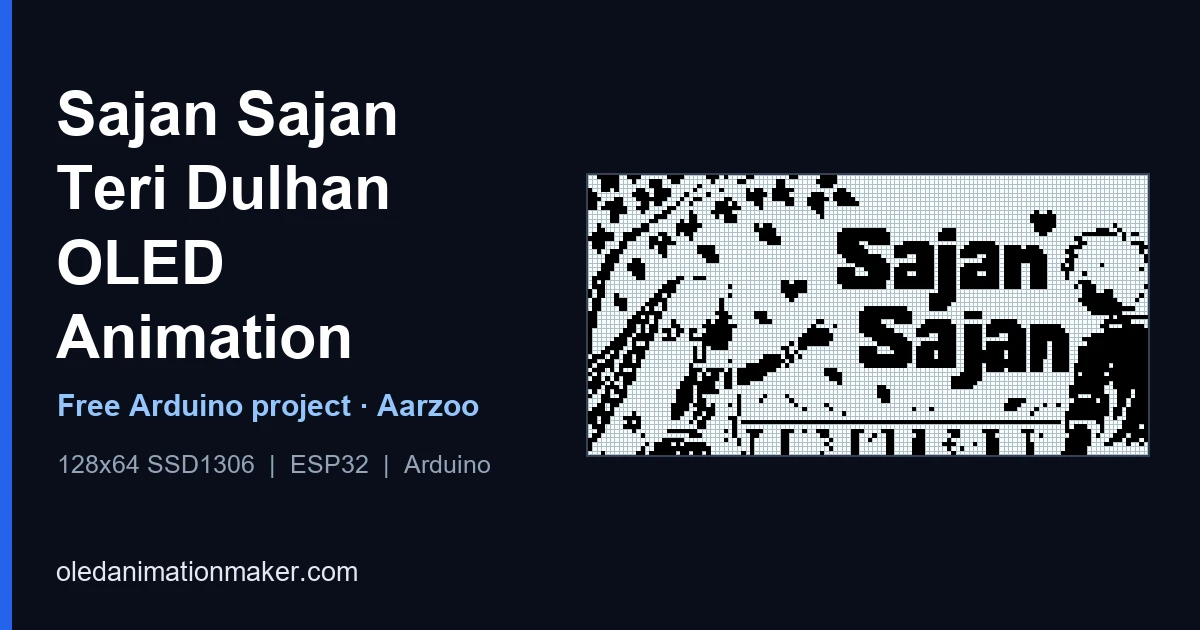
Want Sajan Sajan Teri Dulhan Tujhko Pukare Aaja (साजन साजन तेरी दुल्हन तुझको पुकारे आजा), the Aarzoo classic sung by Alka Yagnik, to play on a tiny 0.96" SSD1306 OLED? This project runs a full 338-frame mono animation loop with Adafruit SSD1306. The cover above shows frame 175 of the sketch on the same 128×64 pixel grid as the OLED. It works for desk toys, wedding-season gifts, Hindi song reels and GIF-to-OLED experiments.
⬇ Free download, Sajan Sajan OLED code
You get the full main.ino with all PROGMEM frames · ZIP or git clone
How to use it
You need a 4MB ESP8266 (NodeMCU or Wemos D1 Mini), a 0.96" SSD1306 I2C OLED, four jumper wires and a USB data cable. The 338 frames take 338 KB of flash, so a classic Uno or Mega can't hold this one.
- Download and extract
Open github.com/itzmeAshish/SajanSajan, click Code → Download ZIP and extract it. You get a folder called
SajanSajan-main. - Rename the folder
Inside you will see
main.ino. Arduino IDE needs the folder name to match, so rename it tomain. - Prepare Arduino IDE (first time only) Add the ESP8266 board package and install Adafruit SSD1306 and Adafruit GFX. The exact clicks, including the board-manager link the ESP8266 needs, are in step 4 of the upload guide.
- Wire it VCC to 3V3, GND to GND, SCL to D1 and SDA to D2, as in the diagram below.
- Upload
Open
main.ino, choose NodeMCU 1.0 and a 4MB flash size, pick the port and click Upload. Open the Serial Monitor at 115200.
Built and tested on ESP8266. New to this, or did something go wrong? The step-by-step upload guide has the full walkthrough and a troubleshooting table. Want it on a different board? Generate code for it on OLED Animation Maker.
Wiring diagram
About the song
Sajan Sajan Teri Dulhan Tujhko Pukare Aaja is a Hindi film song from Aarzoo (1999). It's a wedding-season favourite, which is why a bride-and-groom loop on a tiny OLED works as a gift or a reel.
| Credit | Name |
|---|---|
| Singer | Alka Yagnik |
| Music | Anu Malik |
| Lyrics | Anand Bakshi |
| Film | Aarzoo (1999) |
| Starring | Madhuri Dixit, Akshay Kumar, Saif Ali Khan |
All song rights belong to the original artists and the film's music label. This project is a visual fan tribute only: the sketch contains no audio, and I don't reproduce the lyrics on this page.
Looking for the viral version? There's also a Batman x Sajan Sajan OLED video, a 768-frame 30 fps ESP8266 build.
What's on screen
The loop is a short pixel-art love story told in 1-bit pictures. It opens on a quiet moonlit scene with a figure sitting under a tree. A music-note interlude flashes in bright white, then a couple meets on a balcony under falling blossoms, and the loop closes on a mehendi close-up. The song's words appear as bold on-screen text inside the frames, so you can follow along while the track plays from your phone. There's no audio in the sketch itself.
How the player works
main.ino holds 338 arrays, frame0 to frame337, each 1,024 bytes kept in flash with PROGMEM. The loop() function checks a timer and swaps the picture every 67 ms:
void loop() {
  static uint16_t frameIdx = 0;
  static unsigned long lastMs = 0;
  const uint8_t* frames[] = { frame0, frame1, /* ... */ frame337 };
  const uint16_t numFrames = 338;

  if (millis() - lastMs >= 67) {
    lastMs = millis();
    display.clearDisplay();
    display.drawBitmap(0, 0, frames[frameIdx], 128, 64, SSD1306_WHITE);
    display.display();
    frameIdx = (frameIdx + 1) % numFrames;
  }
}
The 67 is the delay in milliseconds, which makes about 15 frames a second, so 338 frames last 22.6 seconds before the loop restarts. The index is a uint16_t because 338 doesn't fit in 8 bits. On a slow I2C bus the loop can take noticeably longer than 22.6 seconds, and the upload guide shows the one-line fix.
Filming one full pass
Fill the frame with the 0.96" glass and turn off lights that reflect in it. Record at least 30 seconds so one full pass completes, then start your song from your phone if you want sound. The sketch has no speaker, and the loop isn't clock-locked to any recording, so don't expect lip sync. A rolling bar down the panel is a power or I2C problem, not part of the art.
Scene by scene: what the 22.6 seconds show
The loop is a short love story told in 1-bit pictures, and the song's words appear on screen as bold text cards. I'm not reproducing them here, but here's the order of the scenes at the stock 67 ms per frame (frame number × 0.067 s). The ranges are approximate.
| Frames | Time | Scene |
|---|---|---|
| 0 – 66 | 0 – 4.4 s | A quiet moonlit scene by the water, then a pair at sunset |
| 67 – 115 | 4.5 – 7.7 s | Black screen and large white text cards |
| 116 – 165 | 7.8 – 11.1 s | A bright white music-note interlude, the only inverted scene |
| 166 – 235 | 11.1 – 15.7 s | A couple on a balcony under falling blossoms, the bride in a veil |
| 236 – 275 | 15.8 – 18.4 s | Big text cards on black |
| 276 – 311 | 18.5 – 20.8 s | A close-up scene with mehendi |
| 312 – 337 | 20.9 – 22.6 s | A closing scene of the couple with lanterns and the moon, then it restarts |
How one frame is stored in main.ino
A 128×64 screen has 8,192 pixels. In 1-bit mode each pixel is one bit, so a frame is 8,192 ÷ 8 = 1,024 bytes, which is the [1024] you see in every frameN array. The bytes are laid out row by row: each row of 128 pixels is 16 bytes, and inside a byte the leftmost pixel is the highest bit (0x80). That's the format display.drawBitmap() expects.
To find the byte and bit that control any pixel at column x and row y:
byte index = y * 16 + (x / 8)
bit mask   = 0x80 >> (x % 8)
For example, the pixel at x = 20, y = 3 lives in byte 3 × 16 + 2 = 50, and its mask is 0x80 >> 4 = 0x08. Once you know that, a wall of 0x00, 0x3C, 0xFF stops looking like noise.
Preview any frame on your PC
You don't have to flash the board to see a frame. This short Python script reads main.ino, finds the frame arrays and saves one as a PNG, using the exact formula above. It needs Python and Pillow (pip install pillow), and main.ino in the same folder:
import re
from PIL import Image

src = open("main.ino", encoding="utf-8", errors="ignore").read()
frames = re.findall(r"frame(\d+)\[1024\] = \{(.*?)\};", src, re.S)

def frame_image(n, scale=6):
    data = bytes(int(h, 16) for h in re.findall(r"0x([0-9a-fA-F]{2})", frames[n][1]))
    img = Image.new("1", (128, 64))
    for y in range(64):
        for x in range(128):
            if data[y * 16 + (x >> 3)] & (0x80 >> (x & 7)):
                img.putpixel((x, y), 1)
    return img.resize((128 * scale, 64 * scale), Image.NEAREST)

frame_image(175).save("frame175.png")
print(len(frames), "frames found")
It prints 338 frames found and writes a 768×384 picture of frame 175, the couple on the balcony. Change 175 to look at any other frame.
Text in the bitmaps, or text drawn by the code?
In this project the words are part of the pictures, which makes the sketch simple. If you want to put your own message on top, for example the names for a wedding gift, you can draw text with the same library:
display.clearDisplay();
display.drawBitmap(0, 0, frames[frameIdx], 128, 64, SSD1306_WHITE);

if (frameIdx >= 312) {                       // only during the closing scene
  display.setTextSize(1);
  display.setTextColor(SSD1306_WHITE, SSD1306_BLACK);  // white text on a black box
  display.setCursor(0, 56);
  display.print(F("Priya + Rahul"));
}
display.display();| Text baked into the frames | Text drawn by the code | |
|---|---|---|
| Flash | Costs nothing extra, it's already in the 1024 bytes | Tiny: a few dozen bytes |
| Looks | Any font, any size, any effect | Built-in 5×7 font, scaled by setTextSize() |
| Changing it | Re-export the clip | Edit one line and upload |
Turn it into a wedding-season gift
- Pick the stand. A small box, a photo frame with a cut-out for the glass, or a printed case keeps the OLED upright and hides the wires.
- Power it simply. A USB cable to a phone charger or a power bank is enough. Keep the cable short.
- Add the names with the snippet above, and leave a small card with the repo link so the receiver can flash it again.
- Test it for a full hour before you wrap it, so you know the board and cable are stable.
- Dim it. Add
display.dim(true);afterdisplay.begin()for a softer glow and longer panel life.
Use the same code with your own song
Everything in this repo except the pictures is generic. To make a different song, re-export from OLED Animation Maker and paste the new frames over the old ones. Then check three things:
- The frame count. The sketch holds
numFramesin one constant, so make sure it matches your new export. - The flash size. The Arduino IDE prints "Sketch uses N bytes (X%)" after compiling, and that line is the final word on whether it fits.
- The index type. Keep
frameIdxasuint16_tas soon as you pass 255 frames.
Want the version that's currently going viral? There's a Batman x Sajan Sajan OLED video built as a 30 fps player.
If something goes wrong
- Loop takes longer than 22.6 seconds. Add
Wire.setClock(400000);afterdisplay.begin(). - The animation jumps back early. Keep
frameIdxasuint16_t. - My text overlay is unreadable. Use
setTextColor(SSD1306_WHITE, SSD1306_BLACK)so it gets a black box. - Anything else (blank screen, upload errors, sketch too big): see the troubleshooting table in the upload guide.
FAQ
Who sang Sajan Sajan Teri Dulhan Tujhko Pukare Aaja?
Alka Yagnik sang it. Anu Malik composed the music and Anand Bakshi wrote the lyrics, for the 1999 film Aarzoo.
Which movie is it from?
Aarzoo (1999), starring Madhuri Dixit, Akshay Kumar and Saif Ali Khan.
Can I put my own names on it?
Yes. Draw text after drawBitmap() with display.setCursor() and display.print(), and use display.setTextColor(SSD1306_WHITE, SSD1306_BLACK) for a readable black background. The wedding-gift section above has a full snippet.
How long is one loop?
338 frames at 67 ms is about 22.6 seconds per pass, then it repeats.
Does it work on a 1.3" OLED?
Many 1.3" modules use the SH1106 chip, not the SSD1306, and with this library they can show a shifted or noisy edge. Check the chip first and read the SH1106 vs SSD1306 guide.
Related posts
Free tools: OLED Animation Maker for your SSD1306 and SH1106 animations, Assemble Studio for your name and logo animations, and the Shadow Box Lamp Generator for your 3D-printed shadow lamps. See all tools.