SH1106 vs SSD1306: Which OLED for Animations?
Picture this: you buy a 0.96-inch OLED display, wire it up exactly like the tutorial says, upload your code, and... the image is shifted two pixels to the right with a weird sliver cut off on the edge. You triple-check your wiring. You re-read the code. Everything looks correct. What's going on? Welcome to the SH1106 vs SSD1306 confusion—a trap that catches almost every maker at some point. It got me good when I bought a batch of cheap displays online.
Here's the deal: tons of 128×64 OLED modules look completely identical on the outside. Same size, same pins, same blue glow. But inside, they use one of two different controller chips—the SSD1306 or the SH1106. And if you tell your code the wrong one, your graphics end up shifted or cut off. It's not your wiring, it's not your code logic—it's a mismatch between the chip and the software driver.
In this guide, I'll explain the difference between these two controllers, why the SH1106 causes that annoying offset, how to tell which one you have, and how to fix the shift in your code. By the end, you'll never be confused by a misaligned OLED again. This is honestly one of the most useful things to understand if you work with cheap OLED displays.
Quick comparison: SSD1306 vs SH1106 at a glance
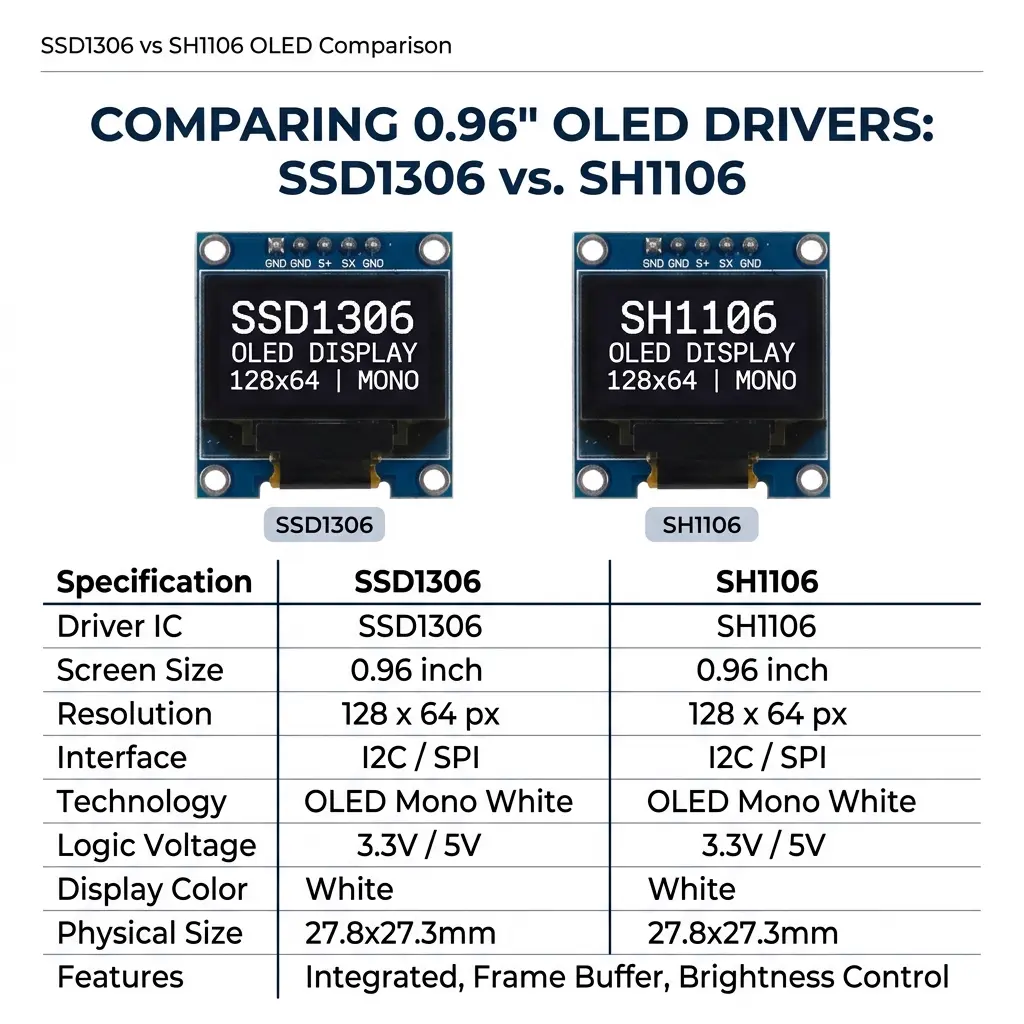
Before we get into the details, here's the side-by-side breakdown of how these two controllers compare:
| Feature | SSD1306 | SH1106 |
|---|---|---|
| Common on | Adafruit modules, 0.96" blue displays | Cheaper clones, 1.3" displays |
| Internal columns | 128 (matches visible area) | 132 (visible area offset by 2) |
| Visible resolution | 128×64 | 128×64 |
| Interface | I²C / SPI | I²C / SPI |
| Typical I²C address | 0x3C | 0x3C |
| Library examples online | Tons (most tutorials use this) | Fewer, but well-supported |
Notice that almost everything is the same—same resolution, same interface, same address. The one critical difference is those internal columns, and that's exactly what causes the famous offset issue.
Why the SH1106 causes that annoying 2-pixel offset
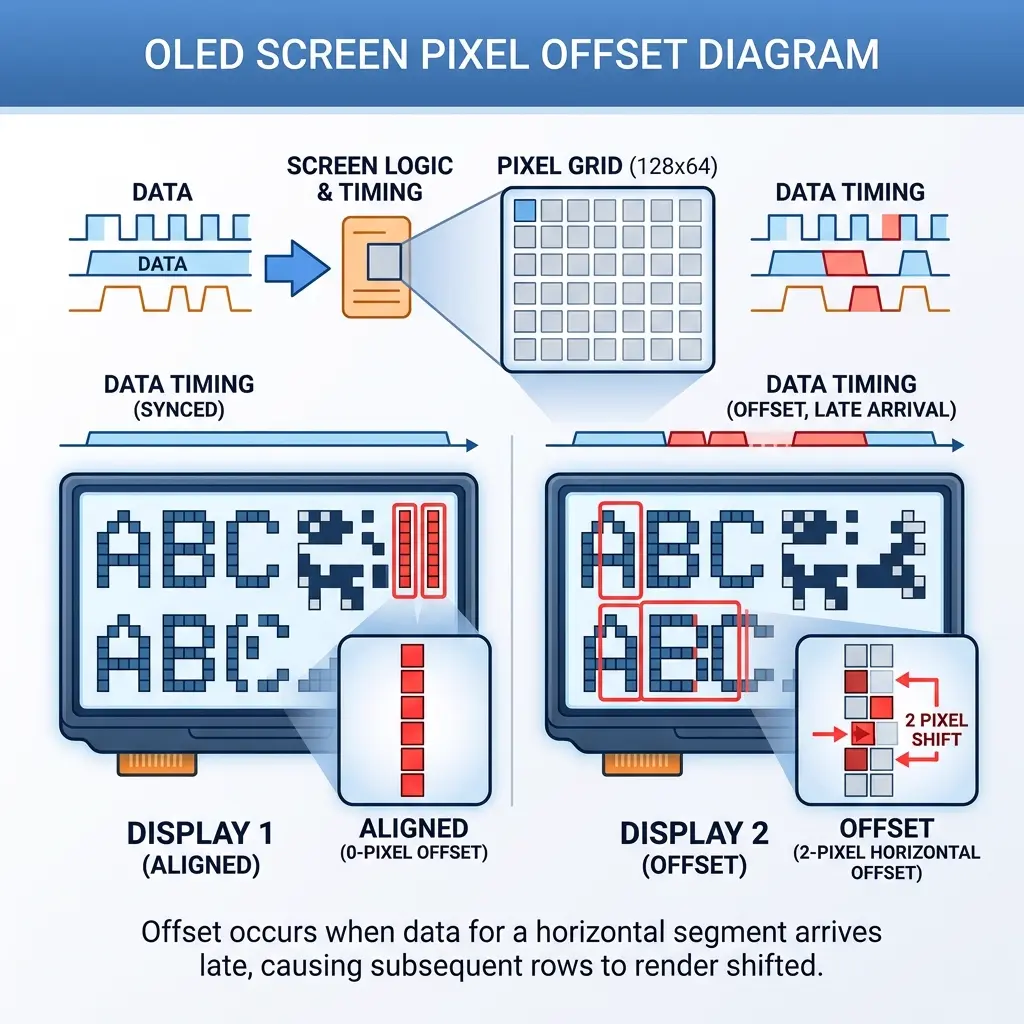
Here's the root cause, explained simply. The SSD1306 controller has exactly 128 columns of memory, and they map directly to the 128 pixels you see. Pixel 0 in memory is pixel 0 on screen. Clean and straightforward.
The SH1106, however, was designed with 132 columns of internal memory. But the visible screen is still only 128 pixels wide. So the display is "centered" within that 132-column memory—meaning the visible area actually starts at column 2, not column 0. Columns 0 and 1 (and 130, 131) exist in memory but aren't shown.
So when you run SSD1306 code on an SH1106, your code writes starting at column 0, but the SH1106 displays starting at column 2. The result? Your entire image shifts 2 pixels left in memory terms, which shows up as a 2-pixel gap on one side and content cut off on the other. It's subtle but really noticeable, especially with text or anything touching the screen edges.
How to fix the SH1106 offset
Good news—the fix is easy once you know the cause. You've got two options:
- Use an SH1106-specific library or setting: Libraries like U8g2 let you specify SH1106, and they handle the offset automatically. If you use the OLED animation maker, just select SH1106 from the display dropdown before generating code, and the correct offset is baked in.
- Manually add a 2-pixel X offset: If you're hand-coding, just add 2 to all your X coordinates. So
drawBitmap(0, 0, ...)becomesdrawBitmap(2, 0, ...). A bit tedious for complex graphics, but it works.
I strongly recommend the first option. Manually adding offsets everywhere is error-prone and a pain to maintain. Let the library or tool handle it.
How do I know which controller I have?
This is the million-dollar question, since the displays look identical. Here are the ways to figure it out, from easiest to most reliable:
- Check the listing/datasheet: If you still have the product page or packaging, it usually states SSD1306 or SH1106. The 1.3-inch displays are more often SH1106; the 0.96-inch ones are more often SSD1306.
- Just test it: Upload SSD1306 code. If the image is perfectly aligned, you have an SSD1306. If it's shifted 2 pixels with a gap on one edge, you have an SH1106. This is honestly how I figure it out most of the time.
- Look at the size: 1.3-inch modules are very commonly SH1106. 0.96-inch modules are usually SSD1306, but not always—the cheap clones can be either.
Pro tip: If you bought a multi-pack of "identical" displays, test each one. I once had a pack of five where four were SSD1306 and one was SH1106. That oddball drove me crazy until I realized they weren't all the same chip!
Which one should you buy?
If you're shopping for a new display, here's my honest take:
Go with SSD1306 if you're a beginner or you follow a lot of Adafruit tutorials. The vast majority of online examples, libraries, and guides assume SSD1306. You'll hit fewer "why doesn't this work" moments because everything just matches.
SH1106 is totally fine if you already own some, or if you want a 1.3-inch display (which are commonly SH1106). The animation quality, frame rate, and capabilities are identical to SSD1306. You just need to make sure your code targets SH1106. Don't avoid a good deal on SH1106 displays just because of the offset—it's a non-issue once you know about it.
Creating animations for both controllers
Here's the reassuring part: the actual animation work is identical for both. The frame data (those PROGMEM bitmap arrays) is exactly the same whether you're targeting SSD1306 or SH1106. The only things that change are the initialization code and the X coordinate offset.
This means you can design your animation once, then just flip the display type in the dropdown before clicking "Get the Code." The tool regenerates with the correct driver and offset. I've reused the same animations across both display types without redrawing a single frame.
Export for SSD1306 or SH1106
Free tool — correct offsets, templates, GIF import.
Open OLED Animation Maker →Popular searches: sh1106 vs ssd1306 · sh1106 oled animation · sh1106 arduino tutorial · 0.96 oled controller · ssd1306 128x64
Frequently asked questions
Is SH1106 better than SSD1306?
Neither is "better"—they're nearly identical in capability and image quality. SSD1306 has more online tutorials and examples, making it easier for beginners. SH1106 is common on 1.3-inch displays and works just as well once your code targets it correctly.
Can I use the Adafruit SSD1306 library with an SH1106 display?
Not directly—you'll get the 2-pixel offset issue. For SH1106, use a library that supports it (like U8g2 or Adafruit SH110X) or manually add a 2-pixel X offset to your coordinates. The U8g2 library handles both controllers cleanly.
Why is my OLED display shifted to one side?
You almost certainly have an SH1106 display but are using SSD1306 code. The SH1106 has 132 internal columns with the visible area starting at column 2, causing the shift. Switch to SH1106 in your code or tool to fix it.
Do SH1106 and SSD1306 use the same wiring?
Yes, completely. Both use the same I²C pins (SDA, SCL), same power requirements, and usually the same address (0x3C). The only difference is in the software driver, not the hardware connections.
How wide is the SH1106 memory compared with the glass?
The visible panel is still 128×64, which is 1024 bytes if you store a normal frame. The SH1106 controller itself has 132 columns. The picture you want starts at column 2, so a 132-wide buffer (or a library that inserts that offset) is what lines the art up.
Will an animation exported for SSD1306 look shifted on SH1106?
Yes, by about two pixels, with a sliver missing on the far edge. Re-export with SH1106 selected, or use a driver that applies the column offset. The frame pixels themselves do not need to be redrawn.
Is the I²C address different on SH1106 modules?
Usually no. Both chips are commonly 0x3C, and some boards are 0x3D. A blank screen is an address or wiring problem. A screen that shows the picture two pixels off to one side is the column offset, not the address.
Worked example: a 132-column buffer with offset 2
Here is the mistake in numbers. A 128×64 mono frame is 128 × 64 / 8 = 1024 bytes. That array is correct for an SSD1306, whose memory is 128 columns wide. An SH1106 still shows 128×64, but its RAM is 132 columns. The glass is windowed onto columns 2 through 129. If you start writing at column 0, the first two columns sit in the hidden margin and the last two columns of your art fall off the other side.
Wiring does not change. Uno SDA is A4 and SCL is A5. ESP32 is GPIO 21 and GPIO 22. ESP8266 NodeMCU is D2 and D1. begin still uses 0x3C on most modules. Only the controller setup and the column start change.
If you are hand-writing Adafruit-style bitmap draws against an SH1106 driver that does not offset for you, the smallest reliable fix is to pass x = 2:
// 1024-byte frame, 128 visible columns.
// SH1106 glass starts at controller column 2.
display.drawBitmap(2, 0, frame, 128, 64, SSD1306_WHITE);
That works when the library’s drawBitmap talks to a 132-wide controller and your bitmap is still 128 pixels. It fails if you also built a 132-wide array and then add another +2. Pick one approach.
The other approach is a 132-column page buffer: 132 × 64 / 8 = 1056 bytes per frame. Columns 0 and 1, and columns 130 and 131, stay zero. Your 128 columns of art are copied in starting at index 2 of each page row. Libraries that advertise SH1106 support (U8g2’s SH1106 constructor, Adafruit SH110X) do this inside the driver so your sketch can keep thinking in 128×64 coordinates. The animation maker does the same thing when the display dropdown says SH1106: the PROGMEM frames stay 128 wide and the generated init applies the offset.
A practical test pattern, before you blame a GIF conversion: draw a one-pixel border with drawRect(0, 0, 128, 64) using an SH1106 driver. You should see all four edges. If the left edge is missing and the right edge is clipped, you are still on an SSD1306 init. If you see a two-pixel empty strip on the left and the right border is gone, you are on SH1106 memory with no offset. Flip the driver or add the column start of 2, upload once, and the same border should close.
Troubleshooting a shifted animation
- Every frame is shifted the same way. That is the controller, not a bad frame in the middle of the GIF. One export setting fixes the whole loop.
- Text is fine, bitmaps are shifted. The text cursor was hand-adjusted by 2 pixels and the bitmap path was not. Use the same origin for both.
- Shift is more than two pixels, or the image is a smear. Wrong width (128×32 art on a 64-tall panel) or a vertical byte order that does not match the library. The SH1106 offset is specifically two columns, not a scramble.
- Blank panel. Try
0x3Cthen0x3D, and confirm SDA/SCL. A working but shifted image has already proved power and I²C. - One module in a “matched” pack is shifted. Test each board with the border sketch. Sellers mix SSD1306 and SH1106 in one bag. Mark the SH1106 so the next project does not inherit the wrong init.
- U8g2 constructor says SSD1306 on an SH1106 board. Change the constructor to the SH1106 variant for your resolution. Do not also add a manual +2 or the art moves too far.
Once the border test closes on all four sides, re-export the animation with that same controller selected. Frame count, FPS, and the 1024-byte visible bitmap stay as they were.