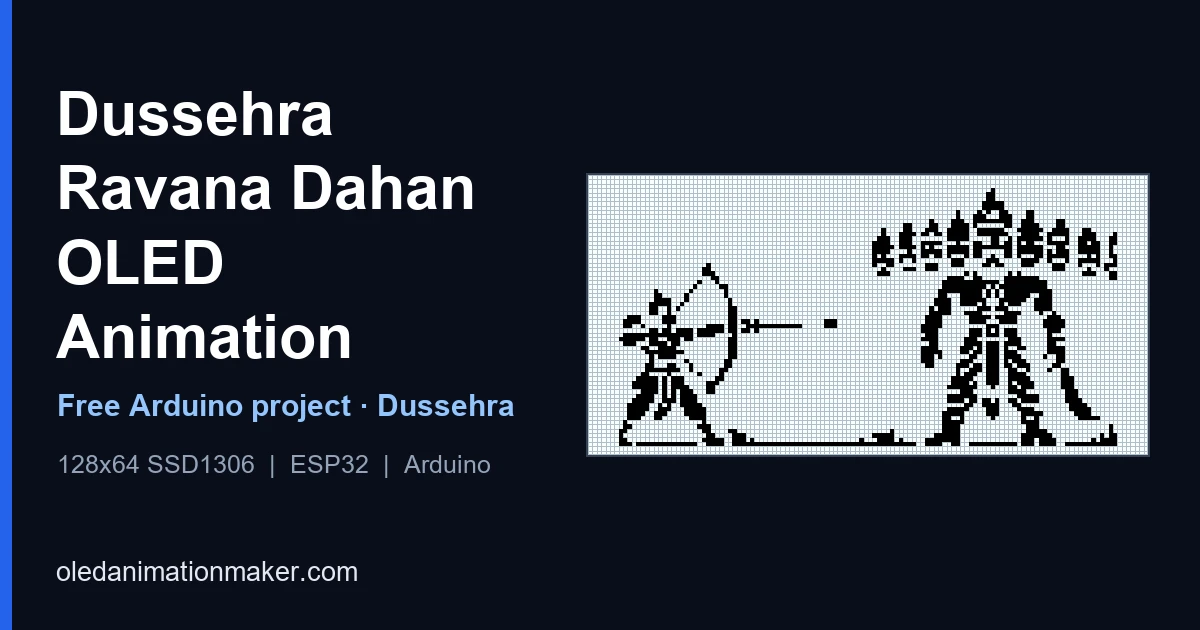
Dussehra (Vijayadashami) falls on 20 October 2026, and this is the version that fits in your palm. The project plays a full 300-frame mono animation on a tiny 0.96" SSD1306 OLED using Adafruit SSD1306. The cover above shows a real frame from the sketch (Rama aiming at Ravana) on the same 128×64 pixel grid as the OLED. It works as a festival desk piece, a college-fest table demo or a reel.
⬇ Free download, Dussehra OLED code
You get the full main.ino with all PROGMEM frames · ZIP or git clone
How to use it
You need a 4MB ESP8266 (NodeMCU or Wemos D1 Mini), a 0.96" SSD1306 I2C OLED, four jumper wires and a USB data cable. The 300 frames take 300 KB of flash, so a classic Uno or Mega can't hold this one.
- Download and extract
Open github.com/itzmeAshish/Dussehra, click Code → Download ZIP and extract it. You get a folder called
Dussehra-main. - Rename the folder
Inside you will see
main.ino. Arduino IDE needs the folder name to match, so rename it tomain. - Prepare Arduino IDE (first time only) Add the ESP8266 board package and install Adafruit SSD1306 and Adafruit GFX. The exact clicks, including the board-manager link the ESP8266 needs, are in step 4 of the upload guide.
- Wire it VCC to 3V3, GND to GND, SCL to D1 and SDA to D2, as in the diagram below.
- Upload
Open
main.ino, choose NodeMCU 1.0 and a 4MB flash size, pick the port and click Upload. Open the Serial Monitor at 115200.
Built and tested on ESP8266. New to this, or did something go wrong? The step-by-step upload guide has the full walkthrough and a troubleshooting table. Want it on a different board? Generate code for it on OLED Animation Maker.
Wiring diagram
What happens on screen
The loop tells the Dussehra story in 1-bit pixel art. Rama stands with his bow drawn facing the ten-headed Ravana. The arrow flies across the screen and hits. Ravana stands for a moment, then catches fire for Ravana Dahan, the burning that people watch in effigy form at Dussehra grounds across India. Embers scatter into a burst of fireworks, and the loop ends on a bold Happy Dussehra message before it restarts. There's no audio in the sketch itself.
The story behind the animation
The scene on your OLED comes from the Ramayana. Ravana, the king of Lanka, abducted Sita. Rama, with his brother Lakshmana, Hanuman and an army of vanaras, crossed to Lanka, and after a long war Rama defeated Ravana. Ravana is traditionally drawn with ten heads, and his name Dashanan means "ten-faced". The word Dussehra is commonly explained as coming from the Sanskrit dasha (ten) and hara (to defeat or remove), while Vijayadashami means "victory on the tenth day".
Dussehra marks the victory of good over evil, and it's also linked to Goddess Durga's victory over Mahishasura. How it's celebrated depends on where you are:
- North India: Ramlila performances run in the nights before Dussehra. On the day itself, big effigies of Ravana, often with Kumbhakarna and Meghnad beside him, are burned at dusk. That burning is Ravana Dahan, and it's the moment your loop recreates.
- Karnataka: Mysuru Dasara is a ten-day festival with a grand procession on Vijayadashami.
- Himachal Pradesh: Kullu Dussehra begins on Vijayadashami and goes on for about a week.
- Bengal and eastern India: the tenth day is Bijoya Dashami, when Durga Puja ends with the immersion of the idols.
- South India: Ayudha Puja around the same days honours tools and instruments, which makers like us can happily claim for our soldering irons.
Dates and puja timings vary by city, so check a local panchang for yours. If you made the Navratri Garba OLED earlier this month, this is the natural second piece, since Dussehra comes right after the nine nights of Navratri.
How the player works
Open main.ino and you'll find 300 arrays, frame0 to frame299, each 1,024 bytes stored in flash with PROGMEM. The loop() function keeps a timer and swaps the picture every 67 ms:
void loop() {
  static uint16_t frameIdx = 0;
  static unsigned long lastMs = 0;
  const uint8_t* frames[] = { frame0, frame1, /* ... */ frame299 };
  const uint16_t numFrames = 300;

  if (millis() - lastMs >= 67) {
    lastMs = millis();
    display.clearDisplay();
    display.drawBitmap(0, 0, frames[frameIdx], 128, 64, SSD1306_WHITE);
    display.display();
    frameIdx = (frameIdx + 1) % numFrames;
  }
}
The 67 is the delay between frames in milliseconds. At 67 ms that's about 15 frames a second, so 300 frames last 20.1 seconds before the loop restarts. A smaller number is faster. The index is a uint16_t because 300 doesn't fit in 8 bits. If your loop takes much longer than 20 seconds, the I2C bus is the bottleneck, and the upload guide explains the one-line fix.
Scene by scene: what the 20.1 seconds show
Here is what each part of the loop shows, with timings at the stock 67 ms per frame (frame number × 0.067 s). The ranges are approximate because the scenes blend into each other.
| Frames | Time | What you see |
|---|---|---|
| 0 – 40 | 0 – 2.7 s | Rama draws his bow and the arrow crosses the screen |
| 40 – 50 | 2.7 – 3.4 s | The arrow lands and a flash bursts over Ravana |
| 50 – 110 | 3.4 – 7.4 s | Rama lowers the bow while fire catches at Ravana's feet |
| 110 – 150 | 7.4 – 10.1 s | Sparks rise from the ten heads and the glow grows |
| 150 – 215 | 10.1 – 14.4 s | Ravana burns with raised arms, flames at their tallest |
| 215 – 255 | 14.4 – 17.1 s | The figure breaks into embers that drift across the screen |
| 255 – 270 | 17.1 – 18.1 s | The embers gather into a burst that forms the text |
| 270 – 299 | 18.1 – 20.1 s | Happy Dussehra with sparkles, then the loop restarts |
Loop only the burning scene
At a stall you may want the dramatic part on repeat instead of the whole story. In loop(), start the index at the first burning frame and wrap it at the last one:
static uint16_t frameIdx = 150;          // start at the burning scene

// ...inside the timed block, replace the wrap-around line with:
frameIdx++;
if (frameIdx > 215) frameIdx = 150;     // loop frames 150-215 (about 4.4 s)
Add a pause button
A single push button lets you freeze the burning scene for a photo. Wire one side to GPIO14 (D5 on a NodeMCU) and the other side to GND, then add this. The pin uses the internal pull-up, so you don't need a resistor:
const uint8_t BTN_PIN = 14;     // D5 on NodeMCU (GPIO14)
bool paused = false;
unsigned long lastPress = 0;

// in setup():
pinMode(BTN_PIN, INPUT_PULLUP);

// at the very top of loop():
if (digitalRead(BTN_PIN) == LOW && millis() - lastPress > 250) {
  paused = !paused;             // toggle on each press
  lastPress = millis();         // 250 ms debounce
}
if (paused) return;             // hold the current frame
Light an LED during the fire
Because the sketch already knows which frame is on screen, you can trigger real hardware at the right moment. Put an LED with a 220 Ω resistor on GPIO13 (D7 on a NodeMCU) and switch it on only while Ravana burns:
const uint8_t LED_PIN = 13;     // D7 on NodeMCU (GPIO13)

// in setup():
pinMode(LED_PIN, OUTPUT);

// right after display.display() inside the timed block:
digitalWrite(LED_PIN, (frameIdx >= 150 && frameIdx <= 215) ? HIGH : LOW);
Run it all day: brightness, rotation and burn-in
A festival table can run this for hours. OLED pixels age with use, and an animation with lots of white pixels ages them faster than a mostly dark one. Three one-line settings help, and you add them in setup() after display.begin():
display.dim(true);               // lower the brightness
// display.setRotation(2);       // flip 180° if the board is mounted upside down
// display.invertDisplay(true);  // swap black and white
dim(true) is the one I'd always use for an event, and the picture stays perfectly readable. If you won't need the screen for a while, display.ssd1306_command(SSD1306_DISPLAYOFF) turns the panel off completely and SSD1306_DISPLAYON brings it back. For more on what the panel draws, read the
OLED power and battery life guide.
Setting it up at a school, college or stall
- Power it from a power bank over USB, so a loose mains plug can't end your show. A short, good cable matters more than you'd think.
- Test the day before. A surprise at the stall is never fun.
- Mount the board. A small box, a cardboard frame or a photo frame with a cut-out keeps the OLED upright and the wires safe.
- Print a card that says what the loop shows and where to download the code. People always ask, and the repo link answers it.
- Bring a spare board and cable. The sketch is small enough to flash in a minute or two.
- Mind the light. A tiny panel disappears in direct sun, so shade it or turn the brightness back up.
Make your own festival animation
Want a Diwali, Holi or Independence Day loop instead? Import a short clip you have the right to convert into OLED Animation Maker, try it in the online simulator, and export code for your own board. For how clips become frames, read GIF to OLED, and for a finished festival project see the Independence Day OLED.
Filming it for a reel
Fill the frame with the 0.96" glass and turn off lights that reflect in it. Record at least 30 seconds so one full 20.1 second pass completes, and so you catch both the burning scene and the Happy Dussehra ending. Dussehra evening, when effigies burn, is the best time to post it.
If something goes wrong
- The animation runs slower than 20 seconds a loop. Add
Wire.setClock(400000);afterdisplay.begin(). - The loop jumps back early. Keep
frameIdxasuint16_t. - The pause button does nothing. Check it goes to GPIO14 and GND, and that you kept
pinMode(BTN_PIN, INPUT_PULLUP). - Anything else (blank screen, upload errors, sketch too big): see the troubleshooting table in the upload guide.
FAQ
When is Dussehra in 2026?
Tuesday, 20 October 2026. Puja and Ravana Dahan timings differ by city, so check a local panchang.
How long is one loop?
300 frames at 67 ms is about 20.1 seconds per pass, then it repeats.
Can I loop just the burning scene?
Yes. Start frameIdx at 150 and wrap it back to 150 after frame 215, as shown in the scene guide above.
Can I show a name or a greeting on top of the animation?
Yes. After drawBitmap() and before display(), call display.setCursor() and display.print(), with display.setTextColor(SSD1306_WHITE, SSD1306_BLACK) so the text keeps a black background.
Does it work on an SH1106 screen?
The sketch targets the SSD1306. An SH1106 panel often shows a shifted or noisy edge with this library, so read the SH1106 vs SSD1306 guide first.
Related posts
Free tools: OLED Animation Maker for your SSD1306 and SH1106 animations, Assemble Studio for your name and logo animations, and the Shadow Box Lamp Generator for your 3D-printed shadow lamps. See all tools.