Online OLED Simulator for SSD1306 and SH1106
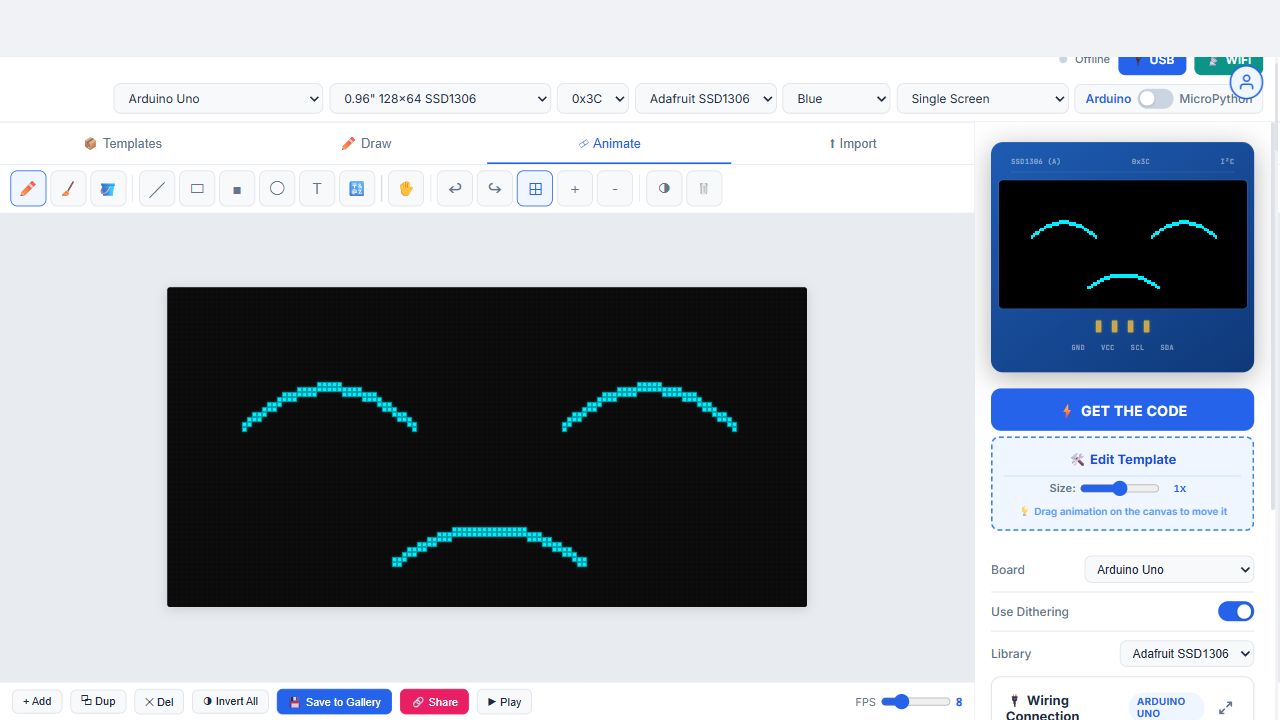
The virtual OLED on the right plays exactly the frames the exported sketch will play
This is the screen simulator built into OLED Animation Maker. It draws a virtual 128×64, 128×32 or 72×40 monochrome OLED in your browser and plays your animation on it at the frame rate you set. Every pixel you see lit here is a pixel that will be lit on the real module, because the preview and the exported Arduino sketch read the same frame data. I built it so students in my workshops could stop flashing a board twenty times just to check whether an icon looked right.
You don't need an account, a download, or a board plugged in. Open the editor, pick a template or draw something, and the simulator runs. When you're happy, click Get the Code and the sketch for your board is ready. That's the whole workflow.
What the simulator does
- Pixel-exact preview. The canvas is scaled up so you can see single pixels, but it's a true 1-bit framebuffer. No anti-aliasing, no grey, the same as the glass.
- SSD1306 and SH1106 mapping. SH1106 modules have 132 columns of memory and show the middle 128, which is why hand-written code often appears shifted by two pixels. Pick SH1106 and the preview and the code both apply the offset.
- Frame rate from 1 to 30 fps. Drag the speed slider and watch the loop. Most real projects look best between 8 and 20 fps, and you'll see that here before you commit flash memory.
- Three display sizes. 128×64 (0.96 inch and 1.3 inch modules), 128×32 (0.91 inch bars) and 72×40 (the tiny 0.42 inch screens).
- Dual screen. Turn on Dual Screen and the simulator shows two OLEDs at I2C addresses 0x3C and 0x3D, which is the setup in the two OLED displays on one Arduino guide.
- Frame count you can reason about. Each 128×64 frame is 1,024 bytes, so a 12-frame loop is about 12 KB and a 40-frame loop won't fit an Uno beside the display library. Count the frames in the timeline and you'll know which board you need before you upload.
How to use it
- Open the editor and choose your board (Uno, Nano, ESP32, ESP8266, Pico and 19 others) and your display size and driver.
- Pick a template from the gallery, draw frames in the pixel editor, or import a GIF, PNG or MP4 clip.
- Watch the simulator on the right. Change the speed, flip frames, or edit pixels until it looks right.
- Click Get the Code. Paste the sketch into the Arduino IDE or Thonny and upload. What you saw in the browser is what plays on the module.
From simulator to real hardware without re-flashing
If you want to see the loop on the actual glass while you edit, the simulator can stream its frames to a board. Upload the small receiver sketch once. After that, the browser sends every preview frame over USB using WebSerial in Chrome or Edge, or over WiFi on ESP8266 and ESP32. The real display mirrors the virtual one in real time, so you can tune contrast and timing live. The USB live connect guide and the WiFi preview guide walk through both.
How this differs from Wokwi and Tinkercad
Wokwi simulates the microcontroller. You paste a sketch and it runs the code, so you can test buttons, timers and logic along with the screen. Tinkercad does the same for a smaller set of boards. This tool doesn't run your code. It simulates the screen itself and then writes the code for you. That makes it faster for the graphics part of a project: drawing a robot face, importing a logo, checking a GIF at 128×64, choosing a frame rate. For a project that needs both, draw and export here, then paste the sketch into Wokwi to test the rest.
Things the simulator catches before you flash
- An imported logo that turned into a blank screen because the threshold was wrong. Move the threshold slider and the preview updates.
- A GIF that looks fine at 400 pixels wide but turns to noise at 128. The simulator shows the dithered result so you can pick a cleaner source.
- Text that runs off the right edge at size 2. You'll see it clipped at column 127.
- An animation that's too fast to read. Drop the fps and watch it again.
- A loop that's too big for an Uno. If the timeline shows more than about 20 frames at 128×64, plan on an ESP32 or ESP8266.
Questions
Is this a full Arduino simulator like Wokwi?
No. Wokwi simulates the microcontroller running your sketch. This simulates the screen: it shows exactly which pixels will be lit and plays the frames at your chosen speed, then writes the sketch. Use both if you want to test logic as well as graphics.
Does it support SH1106?
Yes. Pick SH1106 in the Display menu and both the preview and the exported code use the 132 column memory and the 2 pixel offset those modules need.
Can I simulate a 0.91 inch 128x32 OLED?
Yes. Choose 128×32 in the Display menu. The canvas changes shape and the exported sketch sets the height to 32.
Can I see the animation on a real OLED without flashing every time?
Yes. Upload the receiver sketch once, then the browser streams preview frames to the board over USB or WiFi.
Does it work on a phone?
The simulator and the editor work on a phone browser. USB streaming needs Chrome or Edge on a desktop, because WebSerial isn't available on mobile.
Is it free?
Yes. The simulator, the templates and the code export are free. Projects stay in your browser unless you choose to share one.
Related searches: oled simulator · online oled simulator · ssd1306 simulator · sh1106 simulator · arduino oled simulator · esp32 oled simulator · 128x64 oled simulator · oled display simulator · oled emulator · oled display preview
Open the simulator →