3MF to Web: put your 3D print on any website
Turn a .3mf file into an interactive 3D viewer that anyone can spin, zoom and watch print layer by layer. Copy the embed code, or download one HTML file you can open anywhere.
3D viewers made with this converter
These are the same viewer your website gets. Drag to spin, scroll to zoom, press play to watch the print build up, or press Explode to pull the parts apart.
Gear set
Three gears on a base plate. Press Explode to see each part on its own.
Twisted vase
Light theme with the print simulation. Drag the slider to any layer.
Phone stand
A two-color print with its colors kept from the 3MF file.
The samples are built in code for this page. Your own 3MF file looks the same, with its real parts and colors.
Everything you need to show a 3D print online
One page in your browser. No software to install and no server for your file.
Interactive 3D viewer
Orbit, zoom, pan, auto-rotate and full screen, on desktop and phone.
Layer-by-layer print simulation
The model builds up from the bed like a real 3D printer, with a print head and a layer slider.
Exploded view
An animated Explode button pulls every part apart, so people see how the print fits together.
Parts list
See every part. Click one to highlight it in 3D, hide it with the eye, or give it its own color.
Auto orientation and units
Finds the up axis and the file units for you, with Y-up, Z-up and mm, cm, inch or metre overrides.
Your colors and style
Background, accent color, dark or light control bar, floor grid, auto-rotate and model colors.
Embed code, HTML or ZIP
Paste a snippet, double-click one viewer.html file, or upload a folder to any host.
Private by design
Your 3MF is read inside your browser. It is never uploaded or stored on our server.
How to put a 3MF file on your website
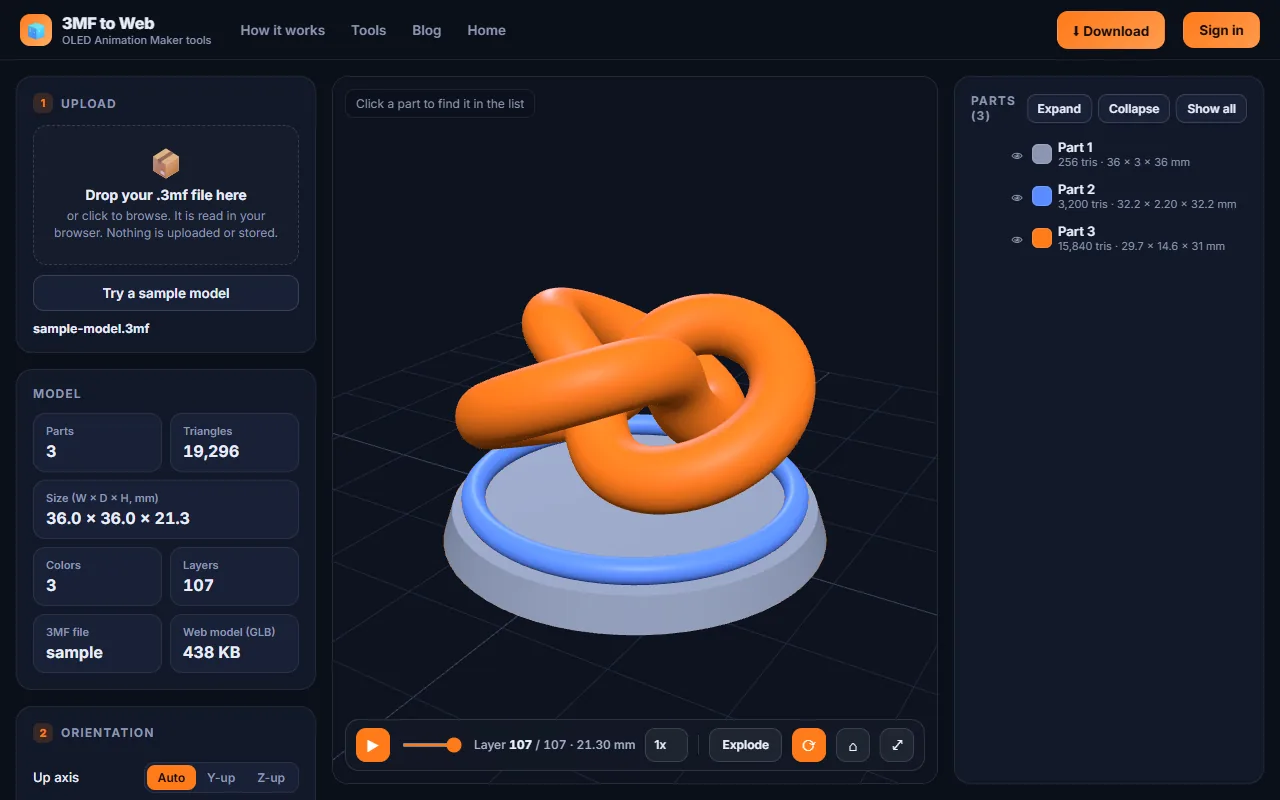
Three steps, about three minutes. Browsers cannot open 3MF on their own, so the converter turns it into a web model and wraps it in a viewer.
Upload the 3MF
Export a .3mf from your slicer or CAD app and drop it into the converter. Every part shows up in the list with its size, triangles and layer count.
Style the viewer
Check the up axis and units, then pick the background, accent color, model colors, explode button and print simulation layer height.
Copy or download
Copy the embed code, download viewer.html, or grab the ZIP. The live preview shows exactly what your visitors will see.
Three ways to add the viewer to your site
Pick the one that fits how you build your website.
Embed code most flexible
Paste into any page that accepts HTML.
- Model as a GLB file you host, or inside the code
- Change the look with simple options
- Works with any website builder
One HTML page
A single viewer.html with the model inside.
- Double-click to open, no server
- Easy to email or share
- Good for portfolios and quotes
ZIP package
A small folder ready to upload.
- index.html, model.glb and model-data.js
- Opens straight from your computer
- README with simple steps
<!-- 3D viewer made with oledanimationmaker.com/tools/3mf-to-web/ -->
<div id="model-3d" style="width:100%;height:480px"></div>
<script type="importmap">
  { "imports": { "three": "https://cdn.jsdelivr.net/npm/three@0.160.0/build/three.module.js", ... } }
</script>
<script type="module">
  import { createViewer } from "https://www.oledanimationmaker.com/js/oled3d-viewer.js";
  createViewer(document.getElementById("model-3d"), {
    model: "model.glb", background: "#0e1320", accent: "#ff7a1a",
    simulation: true, layerHeight: 0.2, explode: true
  });
</script>
An example of the code the converter gives you. Your copy has your own settings filled in.
Show 3D prints on Shopify, WordPress and more
The viewer works on any site that lets you add custom HTML.
3D print shops
Let buyers spin a model before they order, and show how a multi-part print goes together.
Maker portfolios
Show your designs in 3D, not only in photos, with a print simulation that shows how they are made.
Model designers
Preview a model on your own site and send people to your download page.
Teachers and makerspaces
Explain layers, supports and assembly with a viewer students can play with.
Print quotes
Send a customer one HTML file of their part so they can check it before you print.
Robot and kit builders
Use the exploded view to show every part of an enclosure, a gearbox or a robot.
3MF vs STL vs GLB for the web
Why you need a converter, and what it does for you.
| Format | What it stores | Opens in a browser? | Best for |
|---|---|---|---|
| 3MF | Shape, parts, colors, units and build plates | No, it needs a converter | Saving and sharing 3D print projects |
| STL | Only the shape, no colors or units | No, it needs a viewer | Simple single-part prints |
| GLB | Shape, parts and colors in a small file | Yes, with a viewer | Showing 3D models on websites |
The converter reads your 3MF, keeps its parts and colors, and creates the GLB and the viewer for you.
Everything you can set in the 3MF viewer
| Input | Any .3mf file up to 150 MB, including Bambu Studio and OrcaSlicer projects with parts in separate files. |
|---|---|
| Model info | Parts, triangles, size in mm, colors, layer count, 3MF size and web model size. |
| Orientation | Up axis: auto, Y-up or Z-up. Units: auto, millimetres, centimetres, inches or metres. |
| Look | Background, accent color, dark or light control bar, auto-rotate and floor grid. |
| Model colors | Original colors from the file, one color, or a color for each part. |
| Exploded view | Show or hide the Explode button, and set how far the parts fly apart. |
| Print simulation | Layer-by-layer bar, print head, layer height in mm and speed from 0.5x to 4x. |
| Download | Embed code, viewer.html, a ZIP package or model.glb. |
Ready to put your 3D print online?
Open the converter, drop in a 3MF file and see your viewer in seconds.
Convert a 3MF file3MF to Web FAQ
How do I show a 3MF file on my website?
Browsers cannot open 3MF files on their own. Upload the .3mf to the converter, style the viewer, then copy the embed code into your page or download a ready viewer.html file. The tool turns the model into a web format and adds an interactive 3D viewer around it.
Is the 3MF to Web converter free?
Yes. Uploading, previewing and styling are free with no sign-up. Copying the embed code and downloading the files are also free, you only need a free account to unlock them.
Is my 3MF file uploaded to a server?
No. The file is read inside your browser and never leaves your computer. The site only counts how many conversions and downloads happen.
Which slicers and apps make files that work?
Any standard .3mf file. That includes Bambu Studio, OrcaSlicer, PrusaSlicer, Cura, Fusion 360 and other CAD apps. Bambu Studio and OrcaSlicer projects that keep each part in its own file inside the 3MF are merged automatically.
What is the layer-by-layer print simulation?
It slices the model into layers at the layer height you choose, such as 0.2 mm, and builds it up from the bed like a 3D printer, with a small print head and a slider to scrub to any layer.
What do I get: embed code, HTML or ZIP?
Three choices. Embed code to paste into any page, with the model as a separate GLB file or inside the code. A single viewer.html file that opens with a double-click. Or a ZIP with index.html, the model and a README that you can upload to any host.
Can I embed the 3D viewer in Shopify, WordPress, Wix or Squarespace?
Yes, on any site builder that lets you add custom HTML, such as a Custom HTML block in WordPress, a Custom Liquid or HTML section in Shopify, or an embed code block in Wix and Squarespace.
Does it keep the colors of a multi-color print?
Yes. Colors stored in the 3MF are kept. You can also switch to one color for the whole model, or give each part its own color.
How big can the 3MF file be?
Up to 150 MB. Smaller models load faster for your visitors. If the model data is under about 1.5 MB it can also go inside the embed code, so there is no extra file to host.
What is the difference between 3MF, STL and GLB?
STL holds only the shape. 3MF is the modern 3D printing format that also stores parts, colors, units and build plates. GLB is the web format that browsers can show quickly. The converter reads your 3MF and creates the GLB and the viewer for you.